NetBird recently released the beta of their own reverse proxy as an alternative to Cloudflare Tunnels and Pangolin to publicly expose internal services. This post covers how to get instances of the proxy running on any Kubernetes cluster.
tl;dr Gist: https://gist.github.com/konstfish/7e799597d7524f66424942a75c961b90
Note
Since this feature is still in beta I’ll try my best to keep this post updated as the proxy changes.
Information contained in this post was sourced primarily from their announcement video, reverse proxy documentation, reverse proxy migration guide and feeding the proxy directory of the NetBird GitHub repo into pi coding agent.
Prerequisites
NetBird Proxy Token
We’ll first need a secret containing a NetBird proxy token. I’m assuming this only works with tokens generated through the management server directly, at least I haven’t gotten this to work with Service User tokens. NetBird is currently merging management, signal, relay & stun into one netbird-server image. If you’re on that you’ll need to run:
docker exec -it netbird-server netbird-mgmt token create --name "my-proxy"
I’m still on the split management image running on Kubernetes, so it looked like this for me:
kubectl exec -it netbird-management-xxxxxx-xxxx -- /go/bin/netbird-mgmt token create --name "proxy-token"
Output from this command should read:
Token created successfully!
Token: nbx_xxxxxxxxxxxxxxxxxxxxxxxxxxxxxxxxxxxx
Which we’ll use to create a secret netbird-proxy-token with a key token containing it. Oneliner:
`kubectl -n netbird-proxy create secret generic netbird-proxy-token —from-literal=token=nbx_xxx
Certificates
To make this a little more cloud native, I generated the certificates for the proxy server using cert-manager. Assuming you’re planning on serving on *.proxy.example.com your Certificate resource should look like this:
apiVersion: cert-manager.io/v1
kind: Certificate
metadata:
  name: proxy-example-com
spec:
  secretName: proxy-example-com
  issuerRef:
    name: letsencrypt-dns
    kind: ClusterIssuer
  commonName: "proxy.example.com"
  dnsNames:
  - "proxy.example.com"
  - "*.proxy.example.com"
Note this is doing a DNS challenge because of the wildcard domain.
Deployment
NetBird provides the netbirdio/reverse-proxy container image, versioning in line with the client and management server like usual. Interesting env variables for us include:
NB_PROXY_DEBUG_LOGS- which was incredibly useful while figuring out how the proxy works, should be turned off when actually deployedNB_PROXY_MANAGEMENT_ADDRESS- pointed to your NetBird management instance, make sure it’s running a tag above 0.65.1NB_PROXY_DOMAIN- domain this proxy instance will be serving onNB_PROXY_ACME_CERTIFICATES- which we’ll make false in favor of the cert-manager issued certNB_PROXY_CERTIFICATE_DIRECTORY- pointed to a custom directory where the cert-manager created secret is mounted
A complete deployment (with health checks!) should look like this:
apiVersion: apps/v1
kind: Deployment
metadata:
  name: netbird-reverse-proxy
spec:
  replicas: 1
  selector:
    matchLabels:
      app: netbird-reverse-proxy
  template:
    metadata:
      labels:
        app: netbird-reverse-proxy
    spec:
      containers:
        - name: reverse-proxy
          image: netbirdio/reverse-proxy:0.65.1
          env:
            - name: NB_PROXY_TOKEN
              valueFrom:
                secretKeyRef:
                  name: netbird-proxy-token
                  key: token
            - name: NB_PROXY_DEBUG_LOGS
              value: "true"
            - name: NB_PROXY_MANAGEMENT_ADDRESS
              value: "https://netbird.example.com:443"
            - name: NB_PROXY_DOMAIN
              value: "netbird.example.com"
            - name: NB_PROXY_ACME_CERTIFICATES
              value: "false"
            - name: NB_PROXY_CERTIFICATE_DIRECTORY
              value: "/certs"
            - name: "NB_PROXY_LISTEN_ADDRESS"
              value: ":8443"
              # required for health checks, otherwise it just serves on 127.0.0.1
            - name: NB_PROXY_HEALTH_ADDRESS
              value: ":8080"
          ports:
            - containerPort: 8443
          resources:
            limits:
              cpu: 200m
              memory: 256Mi
            requests:
              cpu: 50m
              memory: 128Mi
          startupProbe:
            httpGet:
              path: /healthz/startup
              port: 8080
            initialDelaySeconds: 5
            periodSeconds: 5
            timeoutSeconds: 5
            failureThreshold: 10
          readinessProbe:
            httpGet:
              path: /healthz/ready
              port: 8080
            periodSeconds: 5
            timeoutSeconds: 5
            failureThreshold: 2
          livenessProbe:
            httpGet:
              path: /healthz/live
              port: 8080
            periodSeconds: 10
            timeoutSeconds: 5
            failureThreshold: 3
          volumeMounts:
            - name: certs
              mountPath: /certs
              readOnly: true
      volumes:
        - name: certs
          secret:
            secretName: proxy-example-com
Note
What’s really cool is that once you have a single proxy instance running reliably, the replicas can be scaled to any amount since they will all count towards the same proxy “cluster” on NetBird. The
NB_PROXY_DOMAINenv var decides the proxy cluster the instance is assigned to. I haven’t tested, but I believe that multiple proxies can be deployed on multiple clusters, all under the same domain to provide multiple entrypoints.
Exposing the reverse proxy
LoadBalancer Service
The simpler approach, only requires the target cluster to support LoadBalancer services.
kind: Service
apiVersion: v1
metadata:
  name: netbird-reverse-proxy
spec:
  selector:
    app: netbird-reverse-proxy
  type: LoadBalancer
  ports:
  - name: https
    targetPort: 8443
    port: 443
Proxied through Ingress Gateway
Having any kind of certificates, either issued by the proxy or supplied externally, is unfortunately a hard requirement for now. This makes it a little more challenging to serve from behind existing infrastructure, but still doable, for example with TLSRoutes if you’re on Gateway API. This is still a TODO for my personal setup, so the post will be expanded once I get it working with my Istio gateways.
DNS Records
NetBird suggests creating two records, so we’ll just follow the example:
proxy.example.com.  	1	IN	A	    <LB Service or Ingress public IP>
*.proxy.example.com.	1	IN	CNAME	proxy.example.com.
Debugging
Unimplemented desc = unexpected HTTP status code received from server: 404
If the proxy logs this every few seconds
2026-02-17T22:07:08Z DEBG proxy/server.go:443: connecting to management mapping stream
2026-02-17T22:07:08Z DEBG proxy/server.go:462: management mapping stream established
2026-02-17T22:07:08Z WARN proxy/server.go:481: management connection failed, retrying in 624ms: mapping stream: receive msg: rpc error: code = Unimplemented desc = unexpected HTTP status code received from server: 404 (Not Found); transport: received unexpected content-type "text/html"
you’re most likely also running the management server on Kubernetes. The proxy just ended up hitting the dashboard instead of the management server, so I was able to resolve this by adjusting the ingressGrpc entry from the helm chart to include the new ProxyService endpoint.
  - path: /management.ManagementService
    pathType: ImplementationSpecific
  - path: /management.ProxyService
    pathType: ImplementationSpecific
Health Endpoints
The proxy exposes a lot of information on :8080/healthz, which might be useful to figure out peering issues. For me running a port forward k port-forward pods/netbird-reverse-proxy-5d56b6974b-f95xb 8080 & curling it returns this:
{
  "status": "ok",
  "checks": {
    "all_clients_healthy": true,
    "initial_sync_complete": true,
    "management_connected": true
  },
  "clients": {
    "xxx": {
      "healthy": true,
      "management_connected": true,
      "signal_connected": true,
      "relays_connected": 1,
      "relays_total": 1,
      "peers_total": 1,
      "peers_connected": 1,
      "peers_p2p": 1,
      "peers_relayed": 0,
      "peers_degraded": 0
    }
  }
}
Exposing a Service
Finally, we can expose something! Navigate to Reverse Proxy > Services on the NetBird UI. I chose my laptop in the target list for this example.
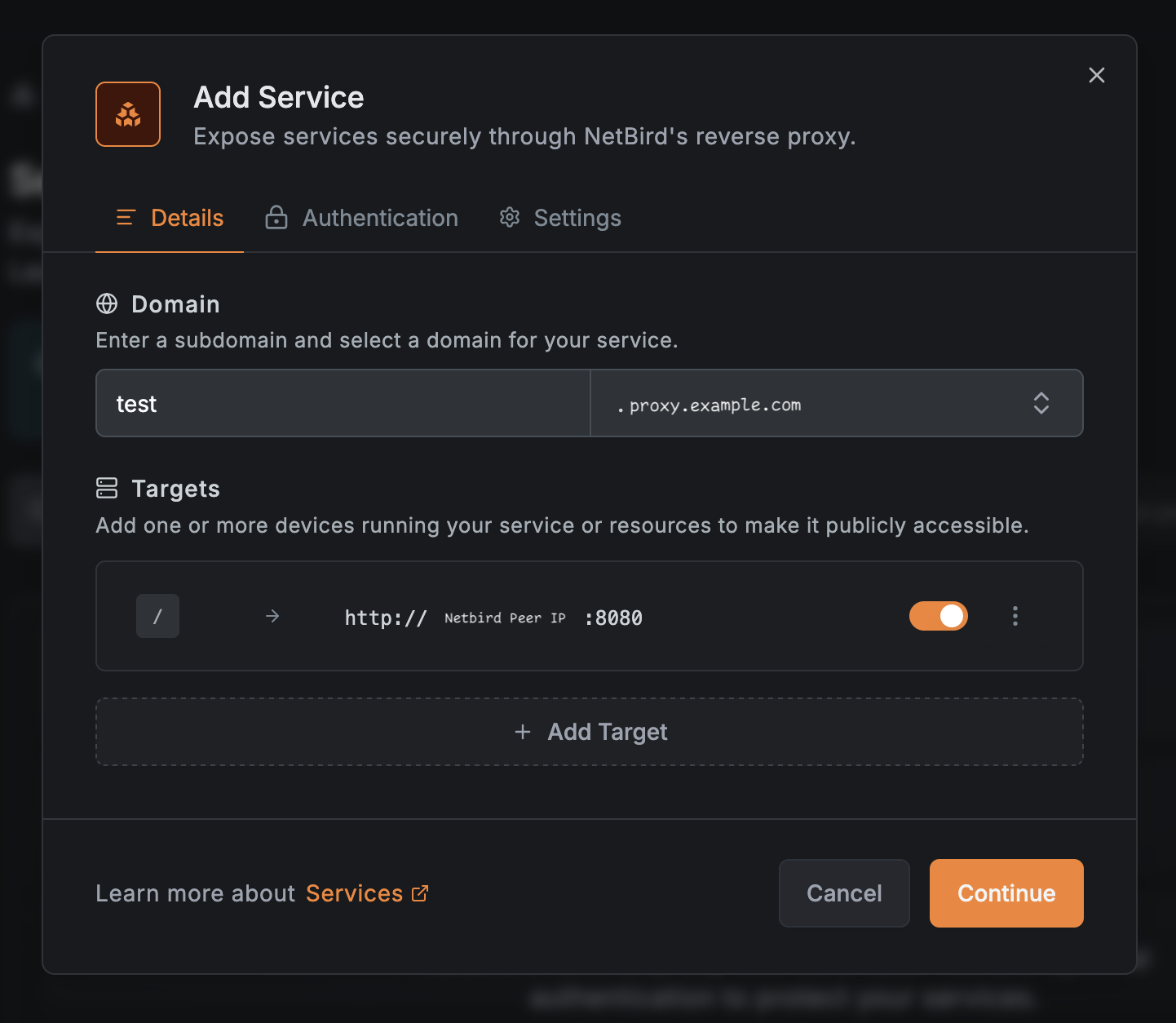
This should result in a listing like this. Right now the “Issuing certificates…” spinner will spin forever. I’m assuming this is because the management server doesn’t handle self-issued certificates. (yet!) We can safely ignore this and move on to testing.

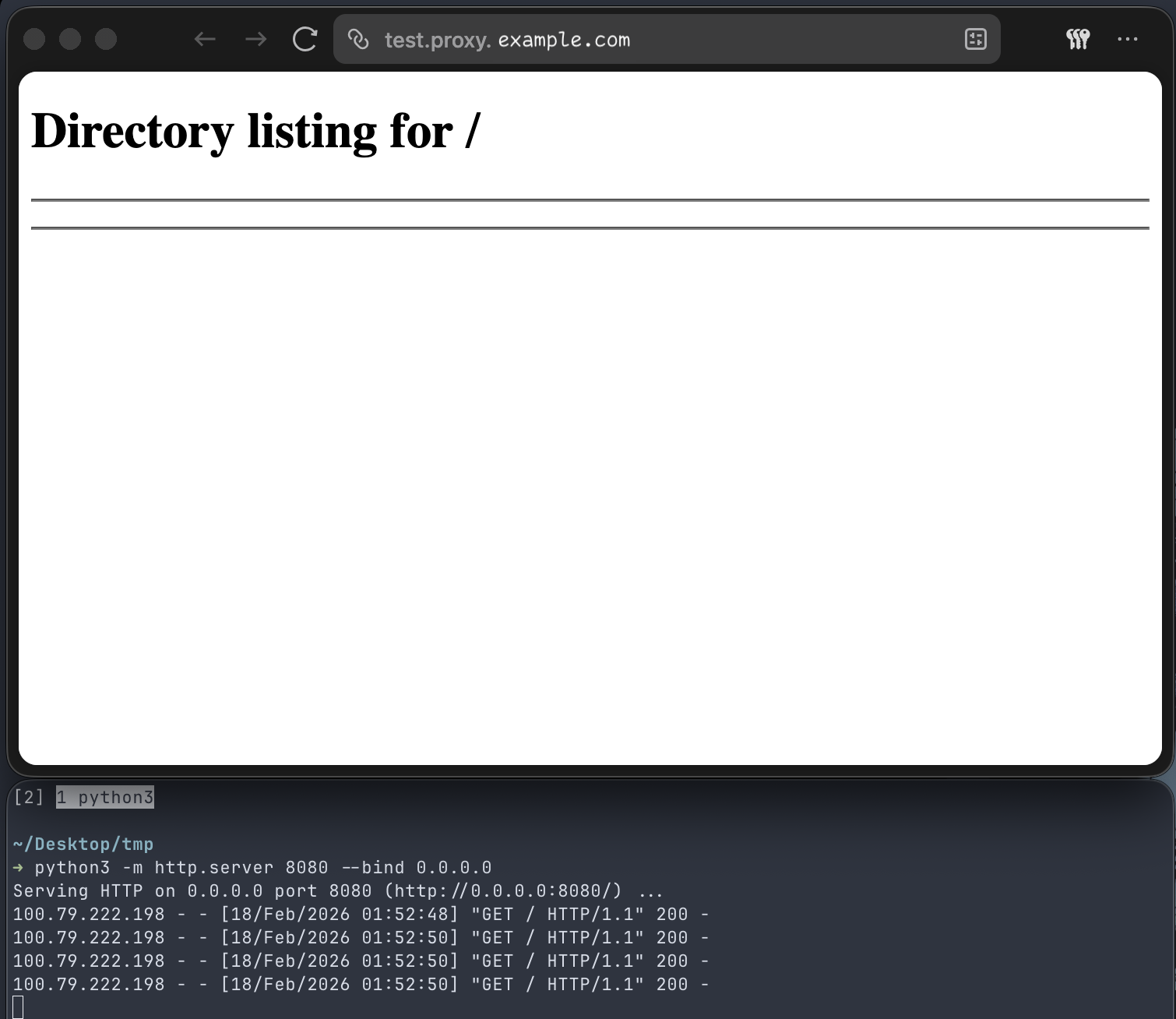
And that’s all! No policies needed, I’m assuming they are automatically derived from the service entry. Example below is a http server running on :8080 on my laptop exposed through the NetBird reverse proxy.
I’m really impressed by what the NetBird team has implemented with this proxy. This was incredibly easy to set up, especially for a feature that’s still in beta.
