The NetBird Kubernetes Operator was the greatest enabler for my most recent Home Lab infrastructure overhaul. I run a multi-cluster, multi-cloud setup and wanted a uniform way to administrate it and expose services. In short, when I'm connected to my NetBird I get access to every clusters API server, a set of apps exposed through the Gateway API, and direct TCP/UDP connectivity to any service that needs it. The cool part, this also works for others users given access with permissions scoped through RBAC!
This post will cover infrastructure requirements, how I chose to set everything up in my opinionated way, and how I'm using mesh networking to interact with my services.
flowchart LR
    user("User<br/>(NetBird Client)")

    subgraph cluster_b["Cluster 2 (barracuda)"]
        subgraph bnbns["NS netbird"]
            peer_b@{ shape: procs, label: "Routing Peers"}
        end
        subgraph bdef["NS default"]
            api_b(["Kubernetes API Server"])
        end
        subgraph bgateway["NS gateway"]
            gw_b("Gateway API")
        end
        subgraph bworkload["NS workload-gateway"]
            http_b{{HTTPRoute}} --> wl_b(["Workload"])
        end
        subgraph bworkload2["NS workload-direct"]
            svc_b{{Service}} --> wl2_b(["Workload"])
        end

        peer_b --> api_b
        peer_b --> gw_b
        gw_b --> http_b
        peer_b --> svc_b
    end

    subgraph cluster_t["Cluster 1 (tetra)"]
        subgraph tnbns["NS netbird"]
            peer_t@{ shape: procs, label: "Routing Peers"}
        end
        subgraph tdef["NS default"]
            api_t(["Kubernetes API Server"])
        end
        subgraph tgateway["NS gateway"]
            gw_t("Gateway API")
        end
        subgraph tworkload["NS workload-gateway"]
            http_t{{HTTPRoute}} --> wl_t(["Workload"])
        end
        subgraph tworkload2["NS workload-direct"]
            svc_t{{Service}} --> wl2_t(["Workload"])
        end

        peer_t --> api_t
        peer_t --> gw_t
        gw_t --> http_t
        peer_t --> svc_t
    end

    user <-->|WireGuard<br>10.94.0.0/16<br>.svc.tetra.local| peer_t
    user <-->|WireGuard<br>10.96.0.0/16<br>.svc.barracuda.local| peer_b
Setup
Infrastructure
The previous version of the operator used the Cluster DNS domain to map NetBird network resources to Kubernetes services. In the new version Cluster DNS has been decoupled from how Routing Peers handle service lookups in favor of using ClusterIPs directly. I was very happy with this change as it made some hacky patching I was doing to CoreDNS redundant. This leaves a multi-cluster setup with a single major architectural consideration, the UX challenge caused by overlapping subnets between clusters. NetBird has the functionality to handle overlapping routes, but it would require constant manual intervention from users to toggle which cluster they want to work with. Thus it would also prevent access to services in different clusters in parallel.
The fix for this is straightforward enough, each clusters CNI needs to be adjusted to allocate a different Service subnet to prevent any overlap in the Networks advertised in NetBird.
flowchart LR
    user("User<br/>(NetBird Client)") -->|10.94.0.0/16| tetr["Cluster 1 (tetra)"]
    user -->|10.96.0.0/16| bar["Cluster 2 (barracuda)"]
Operator
Deploying the new operator has been simplified a lot, it's also packaged as an OCI chart now! Sample Argo App looks like this:
apiVersion: argoproj.io/v1alpha1
kind: Application
metadata:
  name: netbird-operator
spec:
  source:
    repoURL: ghcr.io/netbirdio/helm-charts
    chart: netbird-operator
    targetRevision: 0.8.0
    helm:
      valuesObject:
        cluster:
          name: barracuda # Also sets the name of the NetBird Network
        netbirdAPI:
          keyFromSecret:
            name: "netbird-mgmt-api-key"
            key: "NB_API_KEY"
        # Ideally make a bot user here & create an API key
        # kubectl -n netbird create secret generic netbird-mgmt-api-key --from-literal=NB_API_KEY=nbp_xxx
For a more detailed guide on deploying the operator itself, see the great official documentation. Also as a brief note, keep an eye on the operator logs while creating CRDs, not everything is automated just yet and some steps require manual intervention in the UI.
Routing Peers
Replacing the original NBRoutingPeers the operator now has a NetworkRouter CRD. Works pretty similar to the old equivalent by deploying a set of routing peer pods which will allow exposing cluster internal resources into the NetBird Network.
As CoreDNS is no longer being used for name resolution, the CRD now directly relies on a NetBird DNS Zone. This means any name can be defined as the suffix for the usual service.namespace. records. I chose to keep it inline with the DNS I used for the old operator, thus service.namespace.svc.<cluster>.local. The creation of the NetBird DNS Zone is a manual step in the UI, but this only needs to be done once for every new cluster.
apiVersion: netbird.io/v1alpha1
kind: NetworkRouter
metadata:
  name: barracuda
  namespace: netbird
spec:
  dnsZoneRef:
    name: svc.barracuda.local
Exposing Services
The thing I spent the most time on while migrating to the new operator was creating the new NetworkResource CRDs for each service. Previously the operator did this based on service annotations, but I like the move in this direction. Very reminiscent of a HTTPRoute in how its structured. The groups for the resources (for now) need to be created manually in the UI.
apiVersion: netbird.io/v1alpha1
kind: NetworkResource
metadata:
  name: kubernetes
  namespace: default
spec:
  # NetworkRouter created above
  networkRouterRef:
    name: barracuda
    namespace: netbird
  # Service we're targeting
  serviceRef:
    name: kubernetes
  # Groups the service belongs to
  groups:
    - name: kubernetes:barracuda:admin
The NetworkResource above causes the creation of:
- A network resource pointing to the ClusterIP of the Kubernetes API Server service in the default namespace
- A DNS record in the
NetworkRouterZone pointing to the ClusterIP
Tracing this back, the ClusterIP is 10.96.0.1:
$ k get svc -n default kubernetes
NAME         TYPE        CLUSTER-IP   EXTERNAL-IP   PORT(S)   AGE
kubernetes   ClusterIP   10.96.0.1    <none>        443/TCP   323d
Checking the automatically created network in the NetBird UI shows the same address:
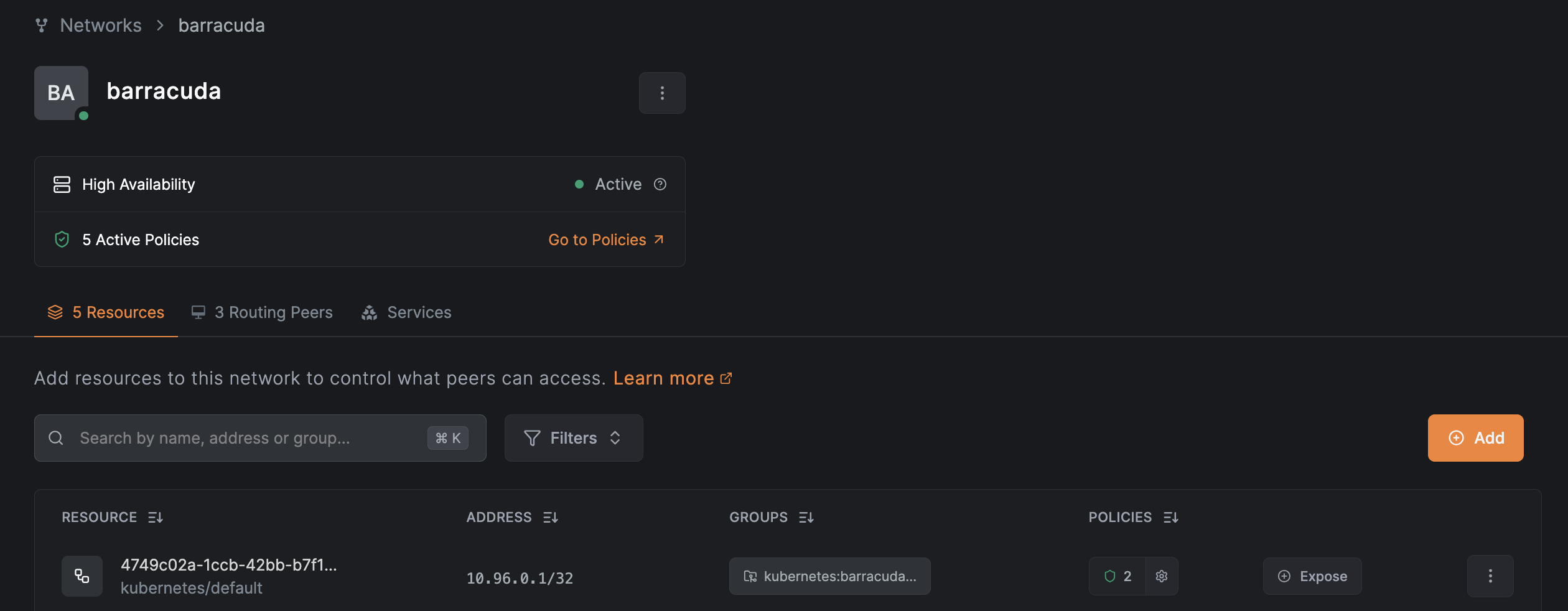
Finally the DNS Zone holds an A record for kubernetes.default.svc.barracuda.local pointing to the ClusterIP service address.

Policies
One thing I miss from the old operator is the ability to create NetBird policies directly as CRDs, right now the way to do it is to create a set of baseline policies in the UI (or over the terraform provider, etc.) and use the groups assigned to the network resources to steer who can access what.
What I recommend doing here is making a set of baseline policies pointing from user groups to resource groups. If a correct policy is set up pointing from a user group to kubernetes:barracuda:admin, a quick netbird networks ls should return something along the lines of:
Available Networks:
  - ID: 4749c02a-1ccb-42bb-b7f1-935df9f79175
    Network: 10.96.0.1/32
    Status: Selected
With this in place the cluster API is now reachable both over both the IP directly & the DNS record. I've been distributing cluster access here by creating kubeconfigs pointed at https://10.96.0.1:443 (or https://kubernetes.default.svc.barracuda.local:443 when added as a cert SAN to the API server) and NetBird does the rest!
The Kubernetes API Server Proxy will make this even better in the future with auth handled through NetBird directly!
Best part is that this setup can now be repeated for any amount of other clusters, only requirements are changing out the domain name and considering the Service subnet networking constraints.
flowchart LR
    user("User<br/>(NetBird Client)")

    subgraph cluster_b["Cluster 2 (barracuda)"]
        subgraph bnbns["NS netbird"]
            peer_b@{ shape: procs, label: "Routing Peers"}
        end
        subgraph bdef["NS default"]
            api_nb(NetworkResource) --> api_b
            api_b{{kubernetes Service<br>10.96.0.1}} --> apis_b
            apis_b(["Kubernetes API Server"])
        end

        peer_b --> api_nb
    end

    subgraph cluster_t["Cluster 1 (tetra)"]
        subgraph tnbns["NS netbird"]
            peer_t@{ shape: procs, label: "Routing Peers"}
        end
        subgraph tdef["NS default"]
            api_tnb(NetworkResource) --> api_t
            api_t{{kubernetes Service<br>10.96.0.1}} --> apis_t
            apis_t(["Kubernetes API Server"])
        end

        peer_t --> api_tnb
    end

    user <-->|10.94.0.0/16<br>.svc.tetra.local| peer_t
    user <-->|10.96.0.0/16<br>.svc.barracuda.local| peer_b
Gateway API
Given that we now have the baseline for accessing any service running on any cluster as if it were local, we can start looking at securely and internally exposing actual workloads.
There's a few issues to solve here, workloads usually won't come with TLS certs, standardizing exposure across teams is difficult, recalling the domain names is tedious, etc.
If this problem set sounds familiar, it's because we already have an abstraction for this, the Gateway API!
Initially I set this up with the old operator and ingress-nginx but have since modernized to the new operator and the Istio implementation of the Gateway API. (Istio is not mandatory here, any conformant implementation will work.)
Gateway
I've set up the Gateways to listen on *.<cluster>.net.konst.fish with the biggest change from a regular config being the services exposed as ClusterIP instead of the regular LoadBalancer type. Config dump below sets up:
- A cert-manager wildcard
Certificatefor the external cluster domain - A
Gatewaylistening on the external cluster domain on :443 with a patch ConfigMap reference - A
ConfigMapto change the Gateways service type to ClusterIP
apiVersion: cert-manager.io/v1
kind: Certificate
metadata:
  name: wildcard-internal-tls
  namespace: istio-ingress
spec:
  dnsNames:
  - "*.barracuda.net.konst.fish"
---
apiVersion: gateway.networking.k8s.io/v1
kind: Gateway
metadata:
  name: http-gateway-netbird
  namespace: istio-ingress
spec:
  infrastructure:
    parametersRef:
      kind: ConfigMap
      name: netbird-gateway-service-config
  gatewayClassName: istio
  listeners:
  - name: https
    hostname: "*.barracuda.net.konst.fish"
    port: 443
    protocol: HTTPS
    allowedRoutes:
      namespaces:
        from: All
    tls:
      mode: Terminate
      certificateRefs:
      - name: wildcard-internal-tls
        kind: Secret
---
apiVersion: v1
kind: ConfigMap
metadata:
  name: netbird-gateway-service-config
  namespace: istio-ingress
data:
  service: |
    spec:
      type: ClusterIP
Connecting through NetBird
To make this resource accessible when connected to NetBird we create another NetworkResource pointed at the Gateways service. Once again pointed at the NetworkRouter set up earlier and a group with a less restrictive policy pointing towards it.
apiVersion: netbird.io/v1alpha1
kind: NetworkResource
metadata:
  name: http-gateway-netbird-istio
  namespace: istio-ingress
spec:
  networkRouterRef:
    name: barracuda
    namespace: netbird
  serviceRef:
    name: http-gateway-netbird-istio
  groups:
    - name: barracuda:gateway
Checking the DNS Zone in the NetBird UI, it should now expose something like http-gateway-netbird-istio.istio-ingress.svc.barracuda.local which when curled should return a 404
$ curl -I http-gateway-netbird-istio.istio-ingress.svc.barracuda.local
HTTP/1.1 404 Not Found
server: istio-envoy
Now all that's left is creating a CNAME for *.barracuda.net.konst.fish that points to http-gateway-netbird-istio.istio-ingress.svc.barracuda.local This is now doable through NetBird entirely since they started supporting wildcard domains in v0.64.0! Previously I did this through an external Cloudflare DNS entry which achieved the same effect. In the NetBird DNS Zone management the record looks like this:

Looking up subdomains from a connected client should now look like this:
$ dig test.barracuda.net.konst.fish
;; ANSWER SECTION:
test.barracuda.net.konst.fish. 1800 IN  CNAME   http-gateway-netbird-istio.istio-ingress.svc.barracuda.local.
http-gateway-netbird-istio.istio-ingress.svc.barracuda.local. 300 IN A 10.107.41.115
Usage
With this setup in place the Gateway can now be used like any other by simply creating HTTPRoutes! Given we have a simple nginx deployment (kubectl create deployment demo-nginx --image=nginx && kubectl expose deployment demo-nginx --port=80) we are able to expose it internally by simply pointing the route to the Gateway, supplying one of the domains from the wildcards subdomains and pointing it at the service.
apiVersion: gateway.networking.k8s.io/v1
kind: HTTPRoute
metadata:
  name: demo-nginx
spec:
  parentRefs:
  - name: http-gateway-netbird
    namespace: istio-ingress
    sectionName: https
  hostnames:
  - "demo-nginx.barracuda.net.konst.fish"
  rules:
  - backendRefs:
    - name: demo-nginx
      port: 80
Accessing the page now presents the nginx welcome page.
$ curl https://demo-nginx.barracuda.net.konst.fish
<!DOCTYPE html>
[...]
<title>Welcome to nginx!</title>
The complete flow is shown below.
flowchart LR
    user["User<br/>(NetBird Client)"]

    dns["NetBird DNS Zone"]

    user -.->|"1. lookup demo-nginx.barracuda.net.konst.fish"| dns
    dns -.->|"2. resolve CNAME, then ClusterIP"| user

    user <--> peer

    subgraph cluster["Cluster: barracuda"]
        subgraph ns_netbird["Namespace: netbird"]
            peer["Routing Peer"]
        end
        subgraph ns_istio["Namespace: istio-ingress"]
            gw["Gateway"]
        end
        subgraph ns_app["Namespace: default"]
            route("HTTPRoute")
            svc["Service demo-nginx"]
            pod["Pod nginx"]
        end
    end

    peer --> gw
    gw --> route
    route -.-> svc
    svc -.-> pod
What this has enabled
Admin is in the easiest state it has ever been in. I have a small wrapper script to load in kubeconfigs from pass, so hopping between clusters takes seconds. Replay below shows me connecting to NetBird and interacting with two remote clusters in different locations.
Access to management services and observability tooling is all unified through NetBird as well.
TODO: write on Grafana + Kiali + Ceph & the ability to just swap out cluster prefix.
TODO: write on Dissagregating auth between clusters, one provides, others just validate
Usage is in a similarly streamlined state. I'm pursuing a Masters right now and have taken a few courses involving group work. My NetBird OAuth is tied to a GitHub Org, so onboarding new users just requires an invite. User roles are drawn from the Org and mapped onto the NetBird accounts. So a shared Jupyter Notebook is just a Deployment & HTTPRoute away. I've also had courses require x86 VMs which were dreadfully slow emulated on Apple Silicon, which is also easily solved with a KubeVirt VM & HTTPRoute. If the VM needs SSH exposed that's also just a NetworkResource pointing to a Service pointing to the VM.
Coding Agents, yeah I'm looping.
The operator and NetBird generally has been an invaluable addition to my stack & I love how easy it has made it to securely provide services! The NetBird team recently restructured the operator in an effort to make it more resource efficient and stable for future expansion. I'm already seeing that in the Kubernetes API Server Proxy and Private Services which once matured might have me deprecate what I've written about here! Even still the setup described in this post was made to stay relatively vendor agnostic, which is also the reason I chose NetBird for mesh networking in the first place as it's fully self-hostable.
